
How to root Bluestacks 5 & MSI App Player 5 with Magisk using ZennoDroid (Android 7, 9, 11, 13)
Root BlueStacks using Kitsune Magisk (an emulator-specific modification of Magisk) without BSTweaker. This method leverages a macro created by the former BSTweaker developer, which uses ZennoDroid.
For a standard root with a read-only system partition, please refer to this tutorial: https://platinmods.com/threads/bluestacks-5-best-emulator-with-root-access-tutorial-2021.126922/
Download the required files:
- BlueStacks 5.22.130.1019 or lower (5.22.150.1014 and higher now enforce integrity checks that detect system changes): https://www.andnixsh.com/2025/12/bluestacks-older-versions-offline.html
- Root macro: https://www.dropbox.com/scl/fi/dm00…ey=qc1sxyk027e1oo672cjpo8prd&st=40t2hwmn&dl=0
- ZennoDroid Enterprise Demo EN:
Official link: https://static.zenno.services/release/ZennoDroidEnterpriseDemo-EN-v2.4.5.0.exe
Mirror link (if link above doesn’t work): https://modsfire.com/Xu7EDYrfXSw1056
Video tutorial:
https://www.youtube.com/watch?v=7-Z5wY2WLjA
Text tutorial:
Install ZennoDroid. When it ask for the login, just create one with fake email
Open BlueStacks multi-instance manager, leave the window open. If you only have single instance, you must create a new instance in order to root properly
Open the file Bluestacks5RootMagisk_vX.droid

Click on Input settings icon

Click on the magnifying glass icon

Select correct Oem and choose a Title of an instance to root
Example, if you are using official Bluestacks version and created an instance called Rooted 11, select Oem as Bluestacks 5, and Title as Rooted 11

When done, click on OK and Save
Close the Input settings
Click on Restart

Now don’t touch anything and watch it running until it stops at the last step "Successfully"
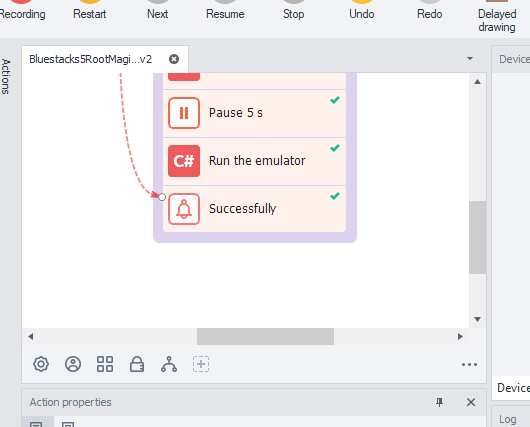
This is the result when the root is successful

If anything fails, read the logs at the bottom-right corner:

Make sure you filled the correct Input settings you did earlier
If you receive an unknown error, first try rebooting your computer and temporarily disabling your anti-virus. If the issue continues, try uninstall BlueStacks, reboot, and then downgrade to an older version.
For further assistance, please contact the macro’s author:
Telegram: BSTweaker_BlueStacks
Youtube: Anatoly Jacobs
4pda: https://4pda.to/forum/index.php?showuser=650585

